WordPress Hosting vs Shared Hosting: Do You Really Need Specialized Servers?
What is the difference between WordPress hosting and regular shared hosting? Discover if specialized WordPress infrastructure is worth the price for your SEO.
 John
John

WordPress Hosting vs Shared Hosting: Do You Really Need Specialized Servers?
When you buy web hosting for a new project, you will almost always see two main options side by side: standard shared hosting and specialized WordPress hosting. At first glance, the pricing can look very similar, or the WordPress option might carry a slight premium.
Many beginners wonder: Is WordPress hosting just a marketing trick, or does it actually change how my website performs?
As an SEO specialist, I can tell you that the differences are deeply technical. While both environments store your website data on a server, WordPress hosting is engineered from the ground up to handle the heavy database architecture and PHP execution that WordPress relies on.
The choice between them determines:
-
How fast your admin dashboard responds when editing content
-
Your site's ability to handle traffic spikes without crashing
-
The level of automated security guarding your core files
-
How much time you spend configuring caching plugins manually
What Is Traditional Shared Hosting?
Traditional shared hosting is a general-purpose server environment. It is designed to host any type of website, whether it is built with basic HTML, Joomla, Drupal, Magento, or WordPress.
Because the server must accommodate everything, it uses a standard configuration (usually Apache servers with basic caching). You receive a blank directory, and you are responsible for setting up databases, configuring security walls, and optimizing your own software layer.
With regular shared hosting, you typically get:
-
Generic server resources shared with hundreds of other sites
-
Standard cPanel or custom administrative control panels
-
General technical support that might not understand WordPress-specific bugs
Standard shared hosting is highly economical, but it requires you to be your own system administrator when optimization is needed.
What Is Specialized WordPress Hosting?
Specialized WordPress hosting is a server environment where every single hardware and software configuration is tailored exclusively to maximize WordPress performance.
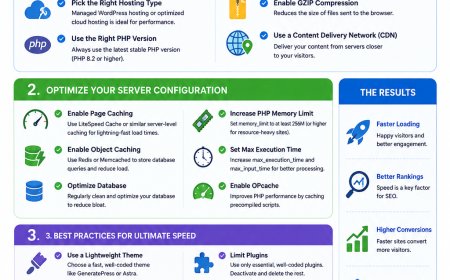
Instead of generic setups, these servers deploy specific resource-handling systems like LiteSpeed or custom NGINX configurations with built-in object caching (like Redis or Memcached). This allows the server to deliver your pages instantly without querying the database every time a visitor clicks a link.
In a dedicated WordPress hosting package, the provider normally handles:
-
Server-Level Caching: No need for heavy third-party speed plugins.
-
Automated WP Core Updates: Security patches applied immediately at the server level.
-
Isolation Mechanisms: Isolating your site resources so bad neighbors don't slow down your traffic.
-
WP Vulnerability Scanning: Active firewalls designed to block specific brute-force attacks targeting the
wp-login.phpfile.
User Experience:
"My elementor-heavy site used to lag constantly in the backend on a generic plan. Moving to a dedicated WordPress server cut my page generation times in half instantly."
Technical Comparison: Under the Hood
The differences become undeniable when analyzing how server resources process requests.
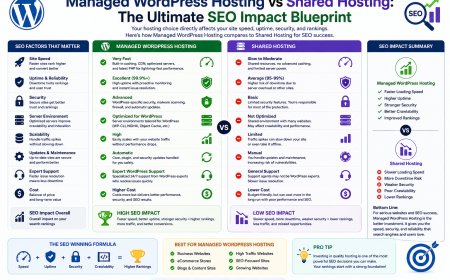
| Architectural Element | Traditional Shared Hosting | Specialized WordPress Hosting |
| Server Engine | Mostly Apache (Standard) | LiteSpeed Enterprise or Optimized NGINX |
| Database Speed | Standard Shared MySQL | Optimized MariaDB / SSD NVMe Storage |
| Caching Layer | Manual (Requires plugins) | Built-in Server-Side Caching (Redis/Memcached) |
| Security Protocol | Generic Server Firewall | WordPress-Specific Threat Monitoring |
| Staging Environment | Rarely Included | 1-Click Sandbox Staging Included |
| Expert Support | General Hosting Support | WordPress Core Technical Specialists |
Managed vs Unmanaged WordPress Hosting: The Price Breakdown
If you decide to go with a specialized WordPress setup, you will encounter two sub-levels: Budget Managed (like Hostinger or SiteGround) and Premium Enterprise Managed (like WP Engine or Kinsta).
For niche sites and affiliate blogs, budget-managed plans offer the absolute highest ROI. However, high-earning e-commerce sites require enterprise setups to handle intense database concurrency.
| Hosting Category | Typical Price Range | Ideal For |
| Standard Shared Hosting | £2–£4 / mo | Hobby sites, test domains, low-traffic portfolios |
| Budget Managed WordPress | £3–£10 / mo | Serious affiliate blogs, niche sites, local businesses |
| Premium Managed WordPress | £25–£100+ / mo | High-traffic e-commerce, corporate sites, media agencies |
How to Decide Which Hosting Environment Fits Your SEO Strategy
The easiest way to map your hosting choice is to look at your growth expectations and technical skills.
You should stick with Standard Shared Hosting if:
-
Your budget is extremely tight and every pound matters today.
-
You are setting up simple, static HTML landing pages.
-
You enjoy manually configuring security plugins, optimization codes, and database backups yourself.
You must upgrade to Specialized WordPress Hosting if:
-
You want an immediate boost in your Interaction to Next Paint (INP) and Core Web Vitals scores.
-
You plan to use heavy page builders like Elementor or Divi, which require high PHP memory limits.
-
You want a dedicated staging environment to test new themes or plugin changes safely before going live.
-
You want to focus 100% on writing content and building backlinks rather than troubleshooting database connection errors.
My Final SEO Verdict
If you are serious about building an organic presence and ranking on search engines, do not host a WordPress site on a generic, unoptimized shared server.
While generic shared hosting is cheap, the time you waste fixing slow page loading speeds and handling security updates will cost you far more in the long run. Investing an extra couple of dollars into a dedicated, LiteSpeed-powered WordPress hosting environment ensures your technical SEO foundation is perfectly secure from day one.
Personally, I see it this way: If your platform is WordPress, your server environment should match it. Choose performance over shortcuts.