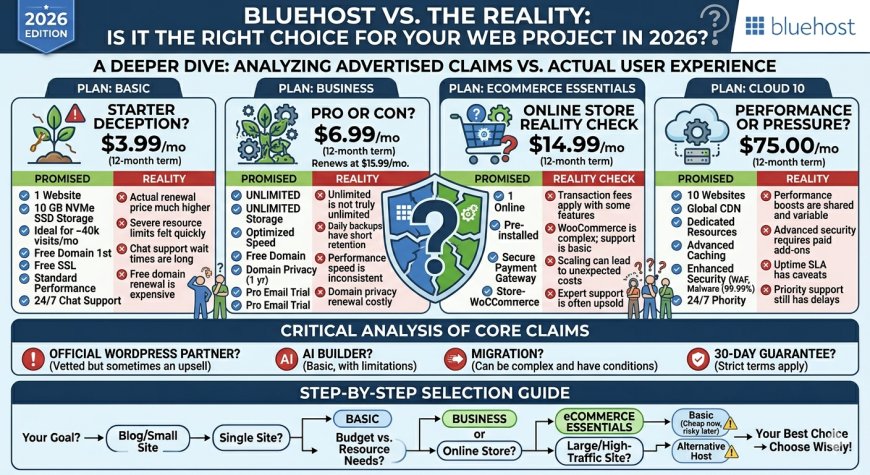
Bluehost vs. The Reality: Is It the Right Choice for Your Web Project in 2026?
Are you considering Bluehost for your web project? We analyze the real performance, pros, and cons of Bluehost in 2026, helping you decide if it fits your specific development needs.
 John Toledo
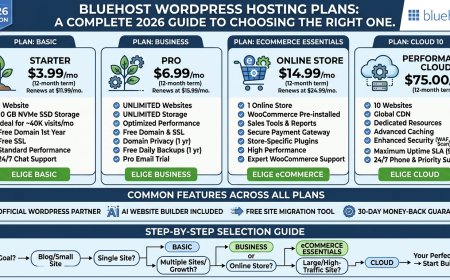
If you spend any time in web development communities, you have likely seen the recurring debate: Is Bluehost actually a solid choice for modern web projects? While it is officially recommended by WordPress.org, developers often have mixed experiences. Let’s look at the reality of Bluehost in 2026 and help you decide if it is the right hosting environment for your specific goals.
The Reality of Bluehost Performance
Bluehost excels at accessibility, but it is important to understand its position in the market.
-
For Beginners: It is arguably the easiest entry point. The one-click WordPress installation and intuitive dashboard allow someone with zero coding experience to go live in minutes.
-
For Developers: If you are building a high-traffic application, a custom API, or a site that requires specific server-side optimizations, shared hosting—regardless of the brand—will eventually hit a ceiling.
Common Pain Points Developers Mention
In forums, you will often read about frustrations regarding shared resources. Here is how to navigate them:
-
Performance During Traffic Spikes: Shared hosting means you share CPU and RAM. If your site goes viral, you might notice sluggishness. The solution? Monitor your site’s resource usage in the dashboard. If you constantly hit limits, it is time to move to a VPS or a dedicated managed environment.
-
Upselling: Bluehost is known for its aggressive upselling of add-ons (like Sitelock or CodeGuard). As a developer, you likely know that you can achieve many of these security and backup features for free using plugins, so do not feel pressured to buy every "one-click" extra they offer.
-
Imunify and Security Tools: Many users worry about security tools slowing down their site. While security is non-negotiable, always test your site’s load speed after enabling heavy server-side monitoring to ensure you find the right balance.
When Should You Actually Choose Bluehost?
You should choose Bluehost if:
-
You are starting your first blog or a small business site.
-
You want a "set it and forget it" experience for WordPress.
-
Your budget is limited, and you need a reliable brand to start with.
You should look elsewhere if:
-
You are building a custom React/Next.js app that requires Node.js support (consider Vercel or Netlify instead).
-
You need extreme performance for a high-volume e-commerce store from day one.
-
You are an advanced user who wants total control over server configuration and terminal access.
Conclusion: The Bottom Line
Bluehost is not inherently "bad," but it is often misused. It is a fantastic entry-level hosting provider for content-driven websites. However, as your project scales, your hosting needs should evolve with it. Use Bluehost to get your foot in the door, learn the basics of managing a domain, and when your project outgrows the shared environment, treat that as a milestone of your success—not as a failure of the hosting provider.
Frequently Asked Questions (FAQ)
1. Is Bluehost good for professional developers? While Bluehost is excellent for beginners and small business owners, experienced developers often prefer VPS or Cloud hosting (like DigitalOcean, Linode, or AWS) for the granular control and superior performance they provide.
2. Does Bluehost slow down my website? Like any shared hosting provider, Bluehost can be slower than dedicated solutions if your site is not optimized. Using a lightweight theme, a caching plugin, and a CDN (like Cloudflare) will significantly boost your performance.
3. Should I buy the extra add-ons Bluehost suggests? In most cases, no. Many of the features Bluehost offers as paid add-ons can be handled for free with reputable WordPress plugins. Only purchase them if you prefer convenience over the time it takes to set up these tools manually.