Managed WordPress Hosting vs Shared Hosting: The Ultimate SEO Impact Blueprint
Does your web host affect your Google rankings? Discover the true difference between managed WordPress hosting vs shared hosting and how it shapes your technical SEO.
 John
John
Managed WordPress Hosting vs Shared Hosting: The Ultimate SEO Impact Blueprint
When launching a new digital asset or managing a client migration, you will eventually face a critical decision: Should you save money with standard shared hosting, or invest in a specialized Managed WordPress Hosting environment?
At a glance, both options store your website files and make your domain visible to the public. However, beneath the surface, the choice you make defines whether your pages climb to position one on Google or get completely buried on page two of the search results.
Google does not care how much you pay for your server infrastructure, but it deeply monitors user experience.
Let's break down the technical realities of shared hosting versus managed WordPress hosting to see how your server setup directly controls your organic traffic.
The Hidden Risks of Traditional Shared Hosting
Shared hosting operates exactly like living in a dense apartment complex with a single water heater for one hundred neighbors. If a few residents decide to take long showers at the same time, your water pressure drops to zero.
On a standard shared server, your website shares memory, processing power, and bandwidth with hundreds of other random domains. If a neighboring site experiences a sudden viral traffic spike or suffers from an unpatched security breach, your website resources collapse instantly.
For an active web project, this environment creates severe operational liabilities:
-
High Time to First Byte (TTFB): Your server takes too long to acknowledge user browser requests.
-
Frequent Micro-Downtime: Small server drops that cause Googlebot crawlers to flag your site as unreliable.
-
Cross-Site Vulnerabilities: If a hacker breaches a weak site on your shared drive, they can potentially access your core file directories.
How Managed WordPress Hosting Drives Organic Growth
Managed WordPress hosting is an enterprise-grade infrastructure ecosystem tailored exclusively to maximize the performance of the WordPress CMS.
By handling the optimization workload at the server level, it directly fixes the core technical metrics that search engine algorithms demand.
1. Seamless Core Web Vitals Optimization
Page speed is an official Google ranking signal. Managed WordPress environments deploy advanced server-side page caching configurations (such as NGINX proxy setups or LiteSpeed) alongside high-speed NVMe storage arrays.
This infrastructure handles asset delivery before WordPress even boots up, drastically lowering your Largest Contentful Paint (LCP) and Interaction to Next Paint (INP) scores without forcing you to buy premium optimization plugins.
2. Proactive Security and Automated Cleanup
If Google flags your domain for hosting malicious code or malware, your organic impressions will drop to zero overnight. While shared hosts leave malware cleanup entirely up to you, managed WordPress hosts provide automated protection layers:
-
Isolated Server Containers: What happens to neighboring websites never affects your platform.
-
Daily Automated Malware Scanning: Proactive firewalls designed to block brute-force attacks on your login directory.
-
Visual Update Testing: Theme and plugin updates are executed in isolated testing environments before being pushed live.
3. Stability Under Sudden Traffic Surges
If an article goes viral or an ad campaign takes off, shared hosts will crash and return a 503 Service Unavailable error. Managed systems deploy cloud scaling technologies that automatically allocate dynamic RAM to process concurrent requests smoothly.
Technical Side-by-Side Comparison
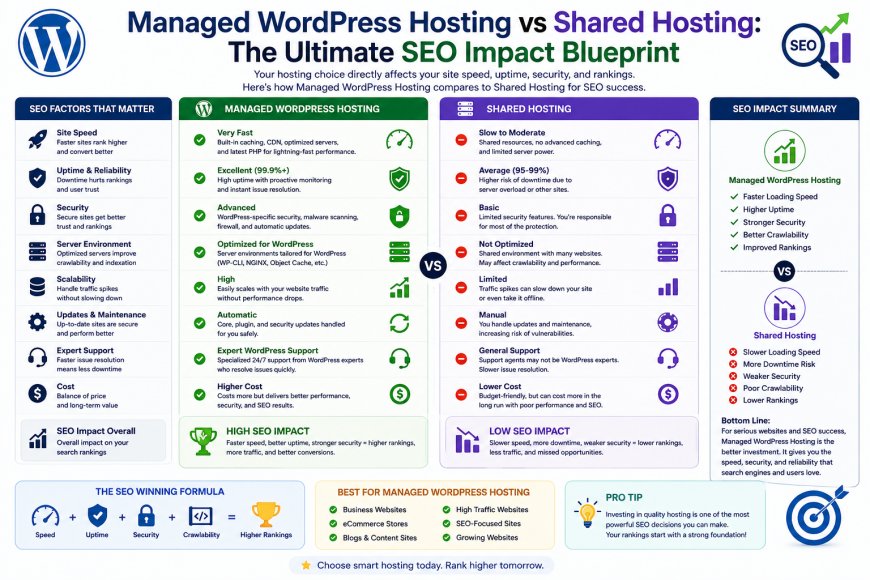
The architectural differences become completely transparent when looking at everyday technical operations.
| Operational Element | Standard Shared Hosting | Managed WordPress Hosting |
| Server Target | Any website type (Generic Apache) | Optimized solely for WordPress execution |
| Data Storage | Standard Solid-State Drives (SSD) | High-Speed NVMe Storage Arrays |
| Caching Tier | Manual setups required via plugins | Automated, built-in server-side caching |
| Resource Shielding | None (Vulnerable to bad neighbors) | Dedicated resource isolation layers |
| Staging Tools | Rarely included on starter tiers | 1-Click Sandbox environments standard |
| Support Quality | General hosting tier assistance | Specialist WordPress system developers |
Who Should Choose Managed Over Shared?
Stick with Standard Shared Hosting if:
-
You are building low-traffic personal blogs, testing experimental code, or setting up temporary landing pages.
-
You have a rock-bottom initial budget and the technical skill set to manage server files, manually run site backups, and harden database security walls yourself.
Upgrade to Managed WordPress Hosting if:
-
Your website generates direct business income, processes e-commerce transactions, or serves as your primary brand storefront.
-
You want to spend your time creating high-value content and building organic backlinks rather than troubleshooting server configuration errors.
My Final SEO Verdict
If your website is an asset designed to acquire organic customers, using cheap shared hosting is a massive long-term financial risk.
The money saved on monthly premiums is quickly lost through slow loading times, frustrated mobile visitors, and dropped keyword rankings. Moving to an optimized Managed WordPress Hosting setup gives your site the technical speed foundation required to beat the competition on page one.
Personally, I see it this way: Your server environment must match your platform. Build on a high-performance foundation, or your SEO efforts will always struggle to cross the finish line.