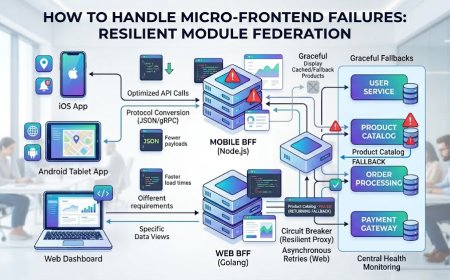
What is Backend For Frontend (BFF)? Architecting for Multi-Client Apps
Are your mobile and web apps struggling with slow API responses? Discover the Backend For Frontend (BFF) pattern to optimize data delivery and reduce client-side latency.
 John
John
What is Micro-Frontend Architecture? Scaling Large Web Applications
As enterprise web applications grow, backend development teams have successfully managed complexity by breaking massive software systems into small, independent microservices. However, the user interface layer often remains a gigantic, tightly coupled monolithic codebase.
When hundreds of developers attempt to commit code to a single frontend repository simultaneously, deployment pipelines slow down, dependency conflicts multiply, and release cycles turn into logistically complex operations. A minor styling fix in an isolated section of a platform can inadvertently crash the checkout flow.
Micro-frontend architecture solves this organizational and technical bottleneck. By applying the principles of microservices directly to the browser layer, this structural approach allows companies to split complex web interfaces into small, fully independent web applications.
The Core Problem: The Frontend Monolith Bottleneck
Traditional frontend architectures force all components, routing logic, and state management systems to share a single build pipeline and runtime environment.
The Monolithic Vulnerability: When multiple engineering teams operate inside a unified repository, they lose operational autonomy. A technical debt choice or an outdated library update implemented by one feature group instantly restricts the development capabilities of every other team in the organization.
Furthermore, monolithic frontends scale poorly under modern performance standards. Users are forced to download massive JavaScript bundles containing parts of the platform they might never interact with, directly harming page load metrics and interface responsiveness.
The Architecture: How Micro-Frontends Work
Micro-frontend architecture divides a web page into distinct operational domains. Each domain is treated as a standalone application that can be developed, tested, and deployed to production independently without relying on a centralized release schedule.
A robust micro-frontend ecosystem coordinates data and rendering through three structural patterns:
-
The Container Application: A lightweight shell interface responsible for rendering common global layout structures, managing user authentication states, and dynamically mounting the individual micro-frontends onto the DOM based on routing rules.
-
Module Federation: A compilation pattern that allows independent applications to dynamically share code and run components at runtime, eliminating the need to bundle common shared libraries multiple times.
-
Decoupled Deployment: Each feature application maintains its own dedicated continuous deployment pipeline, pushing compiled code assets directly to edge servers or cloud storage networks instantly.
Quick Contrast: Monolithic Frontends vs. Micro-Frontends
| Operational Metric | Monolithic Frontend Architecture | Micro-Frontend Architecture |
| Deployment Independence | Low (Everything must be built and shipped together) | High (Each micro-app deploys on its own schedule) |
| Technology Flexibility | Single framework lock-in for the entire site | Multi-framework support per independent domain |
| Code Isolation | Weak (High risk of global styling and state leaks) | Strong (Context boundaries protect application domains) |
| Initial Page Load Size | Heavy (Large unified JavaScript bundles) | Light (Dynamic loading of granular feature modules) |
| Organizational Scaling | Poor (Teams block each other during code reviews) | Clean (Clear boundaries and specialized engineering focus) |
How to Successfully Implement a Micro-Frontend Layout
Transitioning your digital platform into a decoupled runtime model requires a methodical engineering roadmap to ensure consistent user experiences and fast load times.
A Note on Architectural Trade-offs: Micro-frontends introduce operational complexity at the infrastructure layer. If your engineering team is small, the overhead of managing multiple pipelines and continuous deployment configurations will likely outweigh the scaling benefits. Reserve this pattern for large, cross-functional organizational ecosystems.