Technical Hosting Comparisons: Bare Metal vs. Virtualized Cloud Infrastructure
Struggling to choose between bare metal and cloud hosting? Learn the technical differences in resource allocation, performance, and operational scalability.
 John Toledo
Technical Hosting Comparisons: Bare Metal vs. Virtualized Cloud Infrastructure
Choosing the correct hosting topology is the most critical architectural decision in a project's lifecycle. Should you deploy your application onto physical hardware directly, or should you utilize the abstraction layer of a virtualized cloud environment?
For years, developers were forced to choose between the raw, unadulterated performance of physical servers and the operational flexibility of virtual machines. Today, with the maturation of hypervisor technology and global edge networks, this comparison is no longer binary. Understanding the deep-level structural trade-offs is essential to ensure your software architecture aligns with your performance and scaling requirements.
This guide provides a technical comparison of hosting models to help you choose the correct foundation for your platform.
The Core Problem: Abstraction vs. Performance
The tension between physical hardware and virtual cloud hosting comes down to one primary factor: the overhead of the abstraction layer.
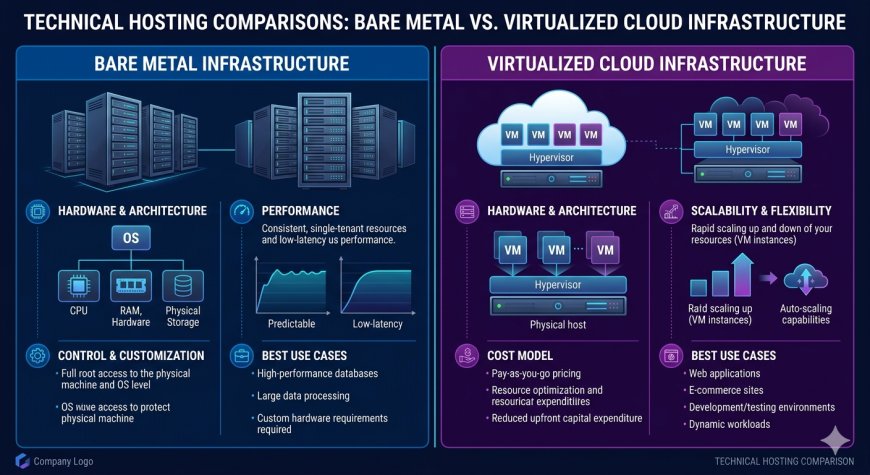
The Performance Trade-off: In a bare metal setup, your operating system interacts directly with the physical CPU, memory controllers, and storage controllers. This results in the lowest possible latency and maximum available compute cycles. In a virtualized cloud environment, your OS interacts with a hypervisor, which emulates hardware for your instance. While modern hypervisors are incredibly efficient, they still introduce a minor computational tax and potential resource contention issues.
Furthermore, cloud environments are multi-tenant by default. Even with high-performance instances, your performance can be impacted by "noisy neighbors"—other users on the same physical host consuming unexpected amounts of shared bus bandwidth.
The Architecture: Comparing Hosting Topologies
Selecting the right hosting environment requires evaluating how your specific workload interacts with the physical hardware layer.
An enterprise infrastructure comparison evaluates the hosting models across three distinct technical dimensions:
-
The Resource Allocation Layer: Analyzes whether the hardware is physically dedicated (Bare Metal) or dynamically allocated from a shared pool (Virtual Cloud).
-
The Scalability Strategy: Measures how effectively the infrastructure can adapt to traffic fluctuations, either through horizontal node cloning or vertical hardware upgrades.
-
The Hypervisor Overhead Tier: Inspects the abstraction cost, focusing on I/O latency, processor context switching, and network virtualization bottlenecks.
Quick Contrast: Bare Metal Hosting vs. Virtualized Cloud
| Operational Metric | Bare Metal Hosting Infrastructure | Virtualized Cloud Infrastructure |
| Resource Dedication | Exclusive (100% of the hardware belongs to you) | Shared (Resources are allocated from a multi-tenant pool) |
| Deployment Speed | Slow (Requires physical setup or PXE booting) | Fast (Instantiates new instances in seconds) |
| Performance Profile | Consistent (No noisy neighbor interference) | Variable (Potential for minor IO/CPU fluctuations) |
| Scaling Flexibility | Hard (Vertical upgrades require physical changes) | Fluid (Auto-scales nodes dynamically based on load) |
| Maintenance Impact | High (Hardware failure requires manual intervention) | Low (Hypervisor automatically migrates instances on failure) |
How to Select the Correct Hosting Model
Choosing the right hosting architecture requires auditing your application's resource demands, specifically focusing on the consistency of your compute and storage workloads.
A Critical Infrastructure Rule: You do not need to choose only one topology. Many modern enterprise architectures utilize a hybrid model: deploying high-concurrency, stateful database clusters on dedicated bare metal instances for maximum I/O performance, while distributing the stateless frontend and application logic across an auto-scaling cloud cluster for elastic global traffic management. This allows you to combine the raw power of physical hardware with the operational speed of modern cloud infrastructure.