App Store Hurdles: How to Streamline Mobile App Deployment in 2026
Struggling with strict App Store testing mandates and long approval times? Discover the best tools and strategies to optimize your mobile application deployment pipeline.
 John
John
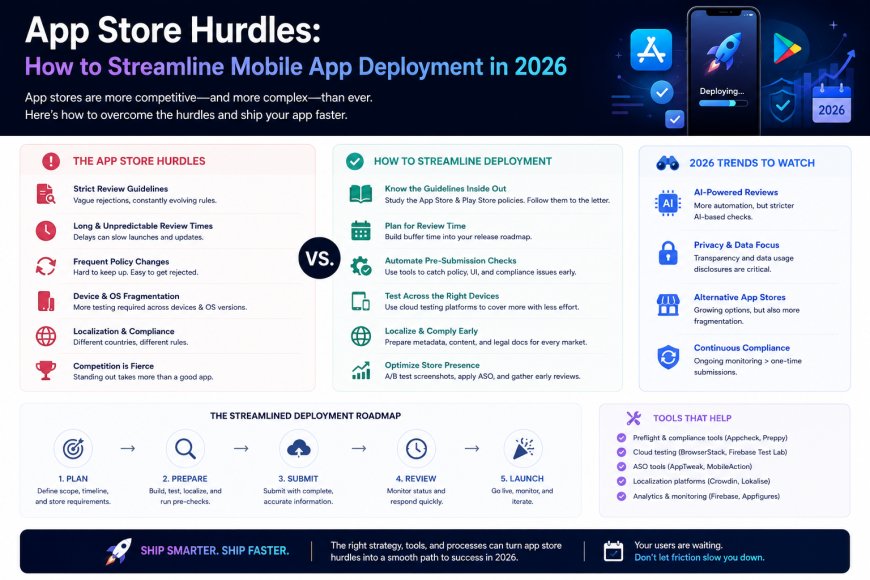
App Store Hurdles: How to Streamline Mobile App Deployment in 2026
The process of writing mobile application code has never been faster thanks to cross-platform frameworks and AI coding assistants. However, the process of actually publishing that code to users has hit a massive compliance wall.
Recent policy shifts across major application marketplaces—such as strict mandatory multi-user testing periods for independent developer accounts—have turned app deployment into a bureaucratic headache. If you are launching a mobile product as an indie developer or an agile startup, navigating these launch friction points can delay your time-to-market by weeks.
To scale successfully, tech teams are abandoning manual, old-school publishing workflows in favor of automated, cloud-based continuous delivery systems. This technical guide outlines the exact strategies you need to streamline your mobile deployment pipeline and push updates to your users with zero unnecessary friction.
The Core Problem: The Bottleneck of Manual Store Verification
Historically, deploying an app meant building a local .apk or .ipa bundle on your machine, logging into a web console, and manually uploading files for review.
Today, this approach presents critical structural limitations:
-
The Tester Mandate Overhead: New compliance frameworks require personal accounts to undergo closed testing phases with dozens of active, internal testers for weeks before production access is granted.
-
Review Latency Friction: Relying entirely on manual store reviews for every minor bug fix destroys continuous integration.
-
Environment Isolation: A build that works flawlessly on a local emulator often crashes instantly on real, fragmented user devices due to hidden native runtime conflicts.
The Strategic Solutions: Modern Mobile Delivery Architectures
To bypass the classic deployment gridlock, software engineers rely on automated pipelines that decouple internal beta testing from final store verification.
1. Over-the-Air (OTA) Updates: Bypassing App Review
If your app is built using Javascript-driven cross-platform frameworks (like React Native or Expo), you can use Over-the-Air updates to push bug fixes directly to user devices instantly.
-
The Foundation: OTA updates modify only the Javascript bundle of your application, bypassing the need to resubmit a new native binary to Google Play or Apple for review.
-
Best Feature: Hot-patching critical runtime bugs in production in under two minutes without forcing your end-users to manually update their app via the store.
-
Ideal For: Pushing minor features, layout updates, and immediate hotfixes.
2. Expo Application Services (EAS): Cloud-Based Build Automation
EAS has standardized the continuous integration and delivery (CI/CD) pipeline for mobile applications by moving the entire compilation overhead to secure cloud environments.
-
The Foundation: Instead of configuring local Xcode environments or complex Android SDK paths on your physical machine, EAS Build compiles your native binaries inside isolated cloud containers.
-
Best Feature: Automated credential management. It handles complex provisioning profiles, keystores, and distribution certificates without human error.
-
Ideal For: Multi-platform teams who want a unified terminal command to build for both iOS and Android simultaneously.
3. Firebase App Distribution: Streamlining Internal Feedback
Before confronting official store reviewers, you must establish an automated internal testing ring to gather crash metrics and user validation seamlessly.
-
The Foundation: A lightweight, cross-platform distribution manager that allows you to bypass the strict testing restrictions of production consoles during your early alpha stages.
-
Best Feature: Instant tester onboarding via secure invitation links, complete with centralized crash reporting and hardware log analysis.
-
Ideal For: Managing internal quality assurance (QA) teams and getting rapid feature feedback.
Comparison Matrix: Manual Uploads vs. Automated Cloud Distribution
| Deployment Pipeline | Manual Local Building | Modern Cloud CI/CD (EAS/Firebase) |
| Hardware Requirement | Heavy (Requires local Mac for iOS compilation) | None (Handled entirely by isolated cloud runners) |
| Credential Management | Manual & Error-Prone | Automated security certificate signing |
| Distribution Speed | Hours (Siloed uploads per platform) | Minutes (Parallel multi-platform distribution) |
| Early Testing Agility | Restricted by strict marketplace policies | Frictionless (Managed via internal tester rings) |
| Crash Visibility | Relies on post-launch production logs | Real-time pre-launch telemetry feedback |
The Strategic Path: Transitioning to an Enterprise Mindset
If you are facing major deployment roadblocks on individual developer profiles, the most effective strategy is to transition your operational structure toward a formal organization ecosystem:
-
Migrate to Business/Organization Accounts: While individual accounts face heavily throttled review tracks and strict manual testing requirements, verified business profiles unlock immediate deployment perks, expedited review tracks, and relaxed pre-production testing mandates.
-
Automate with Fastlane: If you are managing native codebases (Swift/Kotlin), use Fastlane to automate your screenshot generation, beta distribution management, and store deployment metadata updates.
-
Isolate Code via Feature Flags: Deploy your application to the stores with code structures hidden behind server-driven feature flags. This allows your binary to pass strict marketplace reviews quickly, while giving you the power to toggle specific features live for users remotely later on.
Conclusion: The Automated Pipeline is Your Competitive Edge
The engineering teams that dominate the mobile market aren't necessarily the ones with the largest budgets; they are the ones that can push code to users with the least amount of resistance. By embracing cloud-based builds, internal testing rings, and OTA updates, you transform mobile publishing from a frustrating obstacle into a highly predictable, repeatable utility.
How are you handling your mobile releases? Have you migrated your workflow to automated cloud builds yet, or are you still manually wrestling with local SDK configurations and store consoles? Let us know your thoughts in the comments below!